The question shows up in reviews, in interviews, and in every codebase older than about three years:
You discover a table has millions of rows nobody uses anymore, but you're not sure it's safe to delete. How would you approach cleaning it up?
The trap is that it sounds like a SQL question, so people answer with a DELETE
statement. It is really two separate problems wearing one coat:
- A correctness problem — "nobody uses it" is a hypothesis. If you are wrong, you find out when the quarterly report runs, in a month, with no data to rebuild it from.
- An operational problem — even when you are right, deleting millions of rows in one statement is its own outage: lock contention, replication lag, a binlog or WAL spike, and a table that gets bigger on disk afterwards.
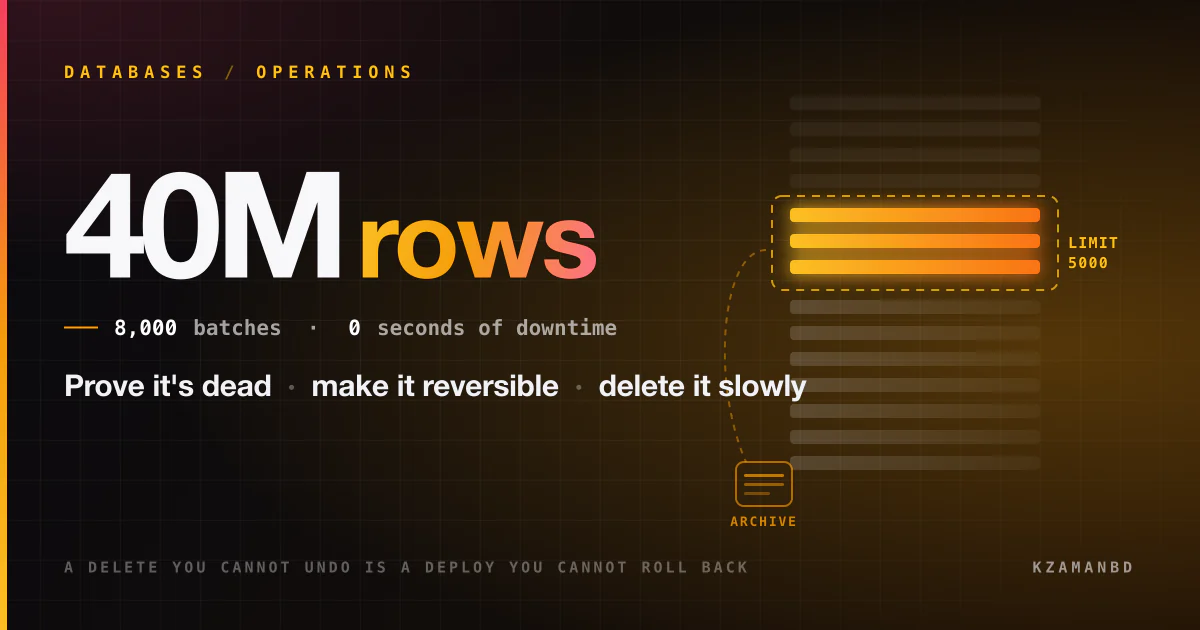
So the shape of the answer is: prove it's dead, make it reversible, then delete it slowly. Nothing destructive happens until the first two are done.
Step 0: the numbers that set the pace
Before designing anything, size the job — the same way you would size a traffic problem.
Napkin math: 40M rows × ~200 bytes/row ≈ 8 GB of table data, plus indexes.
- As one
DELETE: one transaction holding ~8 GB of undo/dead tuples, one binlog or WAL burst of roughly the same order, and a replica that must replay all of it serially.- As 5,000-row batches: 8,000 statements, each a few hundred milliseconds, each individually killable, each giving replicas a gap to catch up in.
Same rows deleted. One version is a multi-hour lock nobody can cancel safely; the other is a script you can stop at any batch. That contrast drives every decision below.
Step 1: prove the table is actually dead
"Nobody uses it" usually means "nobody I asked uses it." Replace opinion with evidence from four independent places — code, the database's own counters, the schema's dependencies, and time.
Evidence 1 — the code
Grep everything, not just the service you're standing in. Old tables die because the service that wrote them was decommissioned and something else still reads them.
# every repo, not just this one — ORM models, raw SQL, migrations, reports
rg -n --hidden -g '!node_modules' -e '\blegacy_events\b' ~/work/*/
Places a table name hides that a code search of one repo misses:
- BI tools and dashboards (Metabase, Looker, Redash) — queries live in their database
- scheduled jobs: cron, Airflow DAGs, Lambda schedules, WordPress
wp_cron - ETL pipelines and replication filters (Debezium, Fivetran, materialised views)
- stored procedures, triggers, and views inside the database itself
- someone's saved query in a SQL client, which is not evidence you can gather — which is exactly why Step 2 exists
Evidence 2 — the database's own read counters
Both engines already count reads per table. This is the strongest signal you can get without changing anything.
PostgreSQL — pg_stat_user_tables has both counters and, since PostgreSQL 16,
timestamps for the last scan of each kind:
SELECT relname,
       seq_scan, last_seq_scan,      -- last_* need PostgreSQL 16+
       idx_scan, last_idx_scan,
       n_tup_ins, n_tup_upd, n_tup_del,
       pg_size_pretty(pg_total_relation_size(relid)) AS total_size
FROM   pg_stat_user_tables
WHERE  relname = 'legacy_events';

-- and the crucial context: how long have these counters been accumulating?
SELECT stats_reset FROM pg_stat_database WHERE datname = current_database();
MySQL — performance_schema counts table I/O:
SELECT object_schema, object_name,
       count_read, count_write, count_fetch, count_insert, count_update, count_delete
FROM   performance_schema.table_io_waits_summary_by_table
WHERE  object_schema = 'app' AND object_name = 'legacy_events';

-- counters are since the last server start, so check what that window covers
SHOW GLOBAL STATUS LIKE 'Uptime';
Warning
These counters reset on server restart (MySQL) or on a stats reset (PostgreSQL), and they are per node. A read-only reporting replica has its own numbers. Check the primary and every replica, and record the window each number covers — "0 reads" over a six-day uptime says almost nothing.
You can also search the query cache for the table name, which catches queries no repo contains:
-- PostgreSQL, needs the pg_stat_statements extension
SELECT calls, rows, query
FROM   pg_stat_statements
WHERE  query ILIKE '%legacy_events%'
ORDER  BY calls DESC;

-- MySQL, the normalised digest table
SELECT count_star, sum_rows_sent, digest_text
FROM   performance_schema.events_statements_summary_by_digest
WHERE  digest_text LIKE '%legacy_events%'
ORDER  BY count_star DESC;
Evidence 3 — what the schema itself points at
A table can be unread by applications and still load-bearing for the schema. Ask the catalog before you touch anything.
-- PostgreSQL: foreign keys pointing *at* this table
SELECT conrelid::regclass AS referencing_table, conname
FROM   pg_constraint
WHERE  confrelid = 'legacy_events'::regclass;

-- PostgreSQL: views and matviews that read it
SELECT schemaname, viewname FROM pg_views     WHERE definition ILIKE '%legacy_events%'
UNION ALL
SELECT schemaname, matviewname FROM pg_matviews WHERE definition ILIKE '%legacy_events%';-- MySQL: foreign keys pointing at it
SELECT table_schema, table_name, constraint_name
FROM information_schema.key_column_usage
WHERE referenced_table_name = 'legacy_events';
-- MySQL: views that read it
SELECT table_schema, table_name
FROM information_schema.views
WHERE view_definition LIKE '%legacy_events%';Two schema-level traps worth naming explicitly:
ON DELETE CASCADE. Deleting 5,000 parent rows can silently delete millions of child rows in the same transaction, which destroys your careful batch sizing. Map the cascade tree before choosing a batch size.- Row-level triggers. They fire per deleted row. A "5,000-row batch" that runs an audit-log insert per row is a 10,000-row write.
Evidence 4 — time
This is the one people skip, and it is the one that bites.
Important
Observe for at least one full business cycle — and the cycle that matters is the longest one, not the shortest. Month-end close, quarterly reporting, and the annual audit export are exactly the jobs that read a table nobody touches for 51 weeks a year.
So: instrument, then wait. Do not delete a table in the first week you noticed it.
Step 2: climb the reversibility ladder
The single most useful reframe: you are not deciding whether to delete. You are choosing the least reversible action you are currently justified in taking. Each rung below is louder than the one above it and still fully undoable.
| Rung | Action | Reverses in | What it proves |
|---|---|---|---|
| 1 | Write down the owner and the intent | — | Someone is accountable |
| 2 | Log or alert on reads | instantly | Who reads it, if anyone |
| 3 | REVOKE access from the app roles |
one command | Nothing needs it, quietly |
| 4 | RENAME the table |
one command | Nothing needs it, loudly |
| 5 | Archive the rows to cold storage | a restore | You can rebuild it if you were wrong |
| 6 | Delete rows / drop the table | a restore | — |
| 7 | Reclaim the space | — | — |
Rungs 3 and 4 are the whole trick. Renaming a table takes milliseconds, is a metadata change only, and converts your silent assumption into a loud, immediate, trivially reversible failure:
-- MySQL
RENAME TABLE legacy_events TO zz_deprecated_legacy_events_20260816;
-- undo: RENAME TABLE zz_deprecated_legacy_events_20260816 TO legacy_events;

-- PostgreSQL
ALTER TABLE legacy_events RENAME TO zz_deprecated_legacy_events_20260816;
-- undo: ALTER TABLE zz_deprecated_legacy_events_20260816 RENAME TO legacy_events;
Anything still reading it now fails with table doesn't exist — a clear error, in your
logs, pointing at the caller, with a one-line fix. Compare that to the alternative,
where the same discovery arrives as a report that silently returns zero rows next
quarter.
The prefix matters more than it looks: zz_deprecated_…_<date> sorts to the bottom of
every table listing, reads as intentional to the next engineer, and carries the date
you started the clock.
title: Two ways to find out you were wrong
packets: on

scenario "Rename first (what to do)"
> Reversible probe. The failure is loud, immediate, and points at the caller.
Job [quarterly export] --> DB (SELECT FROM legacy_events) {neutral}
DB [table renamed] --> Job (ERROR: table doesn't exist) {blocked}
Job --> Alert (job failed, stack trace names the query) {allowed}
Alert [oncall] --> Restore (RENAME back, 1 command, seconds) {secure}
> You learn the table is alive while every row still exists.

scenario "Delete first (what happens instead)"
> Same discovery, months later, with nothing left to read.
Job --> DB (SELECT FROM legacy_events) {neutral}
DB --> Job (0 rows, no error) {blocked}
Job --> Report (renders an empty report) {blocked}
Report [shipped to finance] --> Restore (rebuild from backups, if any) {blocked}
> Silent wrong answers are the expensive failure mode, not errors.
Between rungs, wait. A rename that survives a full month-end is worth more evidence than any query you can run.
Archive before you delete
Rung 5 is cheap insurance. Cold storage costs approximately nothing compared to the conversation where you explain that the data is gone.
-- PostgreSQL: write the rows out before removing them
COPY (SELECT * FROM legacy_events WHERE created_at < '2024-01-01')
TO PROGRAM 'gzip > /archive/legacy_events_pre2024.csv.gz' WITH (FORMAT csv, HEADER);# MySQL: pt-archiver copies to a file and deletes in small, lag-aware chunks
pt-archiver \
--source h=db-primary,D=app,t=legacy_events \
--file '/archive/legacy_events-%Y-%m-%d.csv' \
--where "created_at < '2024-01-01'" \
--limit 1000 --commit-each \
--check-slave-lag h=db-replica --max-lag 1sNote
An archive you have never restored is not an archive. Load one file into a scratch database and count the rows before you delete anything. The same applies to "we have backups" — verify the restore path, not the backup job's green tick.
And check the other direction too: some rows you are legally required to keep (financial records under a statutory retention period), and some you are legally required to remove (a GDPR erasure request). Both make this a policy decision, not just an engineering one.
Step 3: pick the right removal mechanism
Deleting rows one batch at a time is the general answer, not the only one. Choose by what fraction of the table survives.
flowchart TD
    A["Rows to remove"] --> B{"Is the table<br/>partitioned by time?"}
    B -- yes --> P["DROP / DETACH PARTITION<br/>metadata-only, near-instant"]
    B -- no --> C{"Removing<br/>every row?"}
    C -- yes --> T["TRUNCATE<br/>instant, reclaims space"]
    C -- no --> D{"Keeping less<br/>than ~20%?"}
    D -- yes --> R["Rebuild: copy keepers<br/>to a new table, swap"]
    D -- no --> E["Batched DELETE<br/>+ space reclaim"]
Partition drop is the best outcome by a wide margin — it is a catalog operation, so 40M rows disappear in the time it takes to update metadata:
-- PostgreSQL: detach first (brief lock), inspect, then drop at leisure
ALTER TABLE events DETACH PARTITION events_2023 CONCURRENTLY;
DROP TABLE events_2023;

-- MySQL
ALTER TABLE events DROP PARTITION p2023;
TRUNCATE is right only when every row goes. It is far faster than DELETE and
returns the space immediately, with one engine difference worth knowing: in PostgreSQL
TRUNCATE is transactional and can be rolled back; in MySQL it is DDL, so it commits
implicitly and cannot be undone. It also resets AUTO_INCREMENT, which matters if
anything stored those ids elsewhere.
Rebuild-and-swap wins when you are keeping a small minority of rows — copying 2M survivors beats deleting 38M dead rows, and the new table arrives compact instead of bloated:
CREATE TABLE events_new LIKE events;
INSERT INTO events_new SELECT * FROM events WHERE created_at >= '2024-01-01';
RENAME TABLE events TO events_old, events_new TO events;   -- atomic in MySQL
Caution
That copy is only safe if nothing writes to events while it runs — otherwise the
writes land in the old table and are lost at the swap. On a live table use
pt-online-schema-change or gh-ost (MySQL), which maintain triggers or read the
binlog to keep the copy current, rather than hand-rolling it.
Step 4: batch the delete
When batching is the answer, the job is a loop, not a statement. Every batch is a complete transaction that commits and releases its locks.
-- MySQL: repeat until affected rows < 5000.
-- Requires an index on created_at, or each batch scans the whole table.
DELETE FROM legacy_events
WHERE  created_at < '2024-01-01'
ORDER  BY id
LIMIT 5000;-- PostgreSQL: the ctid sub-select keeps each statement's work bounded
DELETE FROM legacy_events
WHERE ctid IN (
SELECT ctid FROM legacy_events
WHERE created_at < '2024-01-01'
LIMIT 5000
);The loop around it is where the safety lives:
#!/usr/bin/env bash
set -euo pipefail

BATCH=5000
while :; do
    deleted=$(mysql -N -B app -e "
        DELETE FROM legacy_events
        WHERE created_at < '2024-01-01' ORDER BY id LIMIT ${BATCH};
        SELECT ROW_COUNT();")

    echo "$(date -u +%FT%TZ) deleted=${deleted}"
    [ "$deleted" -lt "$BATCH" ] && break

    # let replicas catch up before the next batch
    lag=$(mysql -N -B -e "SHOW REPLICA STATUS\G" | awk '/Seconds_Behind_Source/{print $2}')
    while [ "${lag:-0}" -gt 1 ]; do
        sleep 5
        lag=$(mysql -N -B -e "SHOW REPLICA STATUS\G" | awk '/Seconds_Behind_Source/{print $2}')
    done

    sleep 0.2
done
The four properties that make this safe, in order of importance:
- Bounded transactions. Each batch commits, so undo/dead tuples stay small, locks
are short, and
Ctrl-Cbetween batches leaves a consistent database. - Backpressure on replication. Deletes replay serially on replicas. Without a lag
check, a fast loop on the primary puts read replicas minutes behind and breaks
read-your-writes for the whole application. Watch
Seconds_Behind_Source(MySQL) orreplay_laginpg_stat_replication(PostgreSQL). - A predicate the index covers. Without an index on
created_at, every batch full-scans the table and the job gets slower as it progresses. - A visible log. One line per batch, so you can see the rate, estimate the finish time, and stop when something looks wrong.
Tune BATCH down, not up. 5,000 is a reasonable start; if p99 latency moves or lag
grows, halve it. The job finishing an hour later costs nothing.
Step 5: reclaim the space
A surprise for anyone doing this the first time: DELETE does not give the disk
back.
- PostgreSQL marks tuples dead;
VACUUMmakes the space reusable by that table but does not return it to the OS.VACUUM FULLdoes, but takes anACCESS EXCLUSIVElock for the whole rewrite. On a live table usepg_repack, which rewrites it online.1 Expect autovacuum to be busy for a while after a large delete — that is it doing its job. - MySQL/InnoDB leaves the freed pages inside the tablespace. With
innodb_file_per_tableon,OPTIMIZE TABLE(an online rebuild) returns the space to the filesystem; with a shared tablespace it never comes back.
Also refresh statistics afterwards (ANALYZE), or the planner keeps choosing plans
sized for a table 20× bigger than it now is.
Step 6: make it not happen again
The table got to 40M dead rows because nothing was ever going to remove them. Fix that, or you repeat this in two years.
- Write a retention policy in the schema, not in a wiki: partition by month and
drop old partitions on a schedule. That converts this whole article into one cron job
running
DROP PARTITION. - Give every table an owner in whatever catalog you have — even a comment:
COMMENT ON TABLE events IS 'owner: payments-team; retention: 18 months'; - Keep the tombstone. Leave the renamed table in place for a defined period (a quarter is typical), then drop it on a calendar reminder. The rename is the audit trail.
The one-paragraph answer
If you need it in thirty seconds: "Nobody uses it" is a hypothesis, so I'd gather
evidence before touching anything — grep every repo and BI tool, read
pg_stat_user_tables or performance_schema.table_io_waits_summary_by_table on the
primary and every replica, and check the catalog for foreign keys, views and triggers
pointing at it. Then I'd climb a reversibility ladder rather than jumping to DELETE:
revoke access, rename the table so any remaining reader fails loudly instead of
silently, and wait a full business cycle — the annual report is what catches you. Then
archive the rows to cold storage and verify a restore. Only then remove them, choosing
the mechanism by shape: drop a partition if it's partitioned, TRUNCATE if everything
goes, rebuild-and-swap if I'm keeping a small minority, otherwise a batched delete with
replication-lag backpressure. Finally reclaim space with pg_repack or OPTIMIZE TABLE, and add a retention policy so it never grows back.
What the question is really testing
The table is a prop. The transferable moves are:
- Treat "unused" as a claim requiring evidence, and know where the evidence lives.
- Order actions by reversibility, and spend the cheap reversible ones first.
- Prefer loud failures to silent ones — a rename beats a delete because errors are better than wrong answers.
- Bound the blast radius of any bulk operation, and add backpressure from the system that will actually feel it.
- Fix the process, not just the symptom, so the cleanup is a one-time cost.
The same five apply to deleting a feature flag, decommissioning a service, or removing a column. The dead table is just where they are easiest to see.
Footnotes
-
pg_repackrebuilds a table into a new file and swaps it in, taking only a brief exclusive lock at the end rather than holding one for the whole rewrite. It needs enough free disk for a second copy of the table, and the table needs a primary key or a unique, non-partial index on aNOT NULLcolumn. ↩